Before We Start
I built a new local AI server. It is fully operational, and I have the benchmark data—and the results from running some seriously large open-source models—to prove it.
Local AI rigs exploded in popularity in 2026 alongside the growing demand for models that people can run on their own hardware. Unfortunately, the information needed to build one is scattered across the internet. It is often confusing, incomplete, or missing the details that actually matter.
Some build posts are also more concerned with showing off expensive hardware than being transparent about performance, limitations, mistakes, and cost.
This will not be one of those posts.
There will be no lying, selective reporting, bragging, or putting down people who are trying to enter local AI and build their first machine. This is a serious, no-bullshit account of my new build: what is inside it, why I chose each major component, what it can actually run, why I upgraded in the first place, how much it cost—and why that cost matters—and the decisions that go into building a professional local AI system.
This is the first post in a three-part series:
- The Build — the machine, its architecture, its cost, and the physical process of putting it together.
- Commissioning — the evidence that proves what works, what failed, and where the machine’s real limits are.
- The Local Model Testing — the technical report on running and comparing serious open models across this hardware.
The public technical record for Part 1—including the architecture, build notes, airflow design, reconciled bill of materials, and privacy-safe source ledger—is available in the Local LLM Infrastructure V2 repository. Before continuing, you may want to read about my first AI rig—the V1 build—in “48 GB of VRAM and a Dream: Part 1 — The Build.” That machine taught me what worked, what did not, and what I would need from its successor. AI is accelerating quickly, and so am I. It was time to leave the nest and build a monster.
Why V2 Had to Exist

V1 proved that local AI was worth pursuing. I built it before local AI hardware became the obsession it is now, based mostly on a hunch that open models would keep improving and local compute would become increasingly valuable. That hunch paid off—not only in what I learned, but financially and professionally.
The machine centered on two RTX 3090 Founders Edition cards. Together they gave me 48 GB of physical VRAM and enough compute to run models that most consumer systems could not touch. I learned inference, model serving, quantization, GPU topology, memory pressure, thermals, drivers, and the thousand tiny things that never appear in a clean benchmark chart.
V1 worked. That point is important. V2 was not created because V1 failed. V2 exists because V1 succeeded well enough to reveal precisely what I needed next—and every mistake I did not want to repeat.
V1 was built on a consumer AM5 platform: an ASUS ProArt X870E-Creator WiFi motherboard with three physical PCIe slots. Its two CPU-connected GPU slots shared their lanes and operated at x8/x8 when both cards were installed. That was not fatal, but it was one of several reminders that I was asking a consumer desktop platform to behave like a workstation.
The more serious problem was physical. RTX 3090 Founders Edition cards are three-slot monsters. In V1, the cards sat roughly a quarter-inch apart. The lower card could breathe. The upper card inhaled the lower card’s heat and fought for its life. Under sustained load, that became a real thermal limitation.
The machine also ran Windows. Do not even get me started on how much I hate Windows. It has its place (but does it?), but I did not want the next version of this system to be a Windows desktop that happened to run AI software. I wanted Linux. All AI essentially runs on Linux.
V1 had 96 GB of system RAM, which was substantial when I built it but increasingly restrictive as larger mixture-of-experts models became practical. It also lacked hardware-level out-of-band management. If the operating system stopped responding, if networking broke, or if I needed to enter the BIOS, someone had to be physically present.
The next machine needed full-bandwidth expansion, enough physical space for both GPUs to breathe, ECC memory across more channels, substantially greater system-memory bandwidth, native Linux operation, hardware-level remote recovery, better airflow, and room for future CPUs, GPUs, storage, and networking.
Most importantly, I wanted a system designed around local AI from the beginning—not a consumer desktop that happened to contain two GPUs.
The Design Brief: Infrastructure Before Compute

This is the part I believe many local AI builds get backward.
People see cheap used RTX 3090s, read a few Reddit threads, and immediately build around the cards. I understand why. A 3090 still offers 24 GB of VRAM, strong CUDA support, and excellent used-market capacity per dollar. I bought two of them for exactly that reason.
But GPUs are the easiest part of the system to obsess over and one of the easiest parts to replace later. The motherboard, CPU platform, memory architecture, chassis, power delivery, cooling, operating system, and recovery design determine what those GPUs can do—and what can replace them in the future.
My strategy was to keep the valuable compute I already owned and spend the V2 budget on the foundation beneath it.
That meant a WRX90, Threadripper PRO, eight-channel ECC RDIMM, a server-oriented chassis, a high-quality power supply, Linux, and a baseboard management controller (BMC). The objective was not to buy every dream component in one financially suicidal afternoon. The objective was to create a platform that could earn its upgrades over time.
I could have spent the entire budget on newer GPUs and left them trapped inside another compromised consumer platform. Instead, I built the infrastructure first.
I took a gamble, and here it is, the bet is simple: models will continue becoming better, smaller, more sparse, and more efficient. The GPUs I use five years from now may be completely different. The need for lanes, memory capacity, cooling, power, remote recovery, and physical expansion will remain (for now).
The Build at a Glance
| Component | V2 configuration |
|---|---|
| CPU | AMD Ryzen Threadripper PRO 9955WX — 16 cores / 32 threads |
| Motherboard | ASUS Pro WS WRX90E-SAGE SE |
| GPUs | 2× NVIDIA GeForce RTX 3090 Founders Edition |
| Physical VRAM | 48 GB combined |
| System memory | 128 GB Kingston FURY Renegade Pro DDR5-6400 ECC RDIMM — 8×16 GB |
| Active memory configuration | DDR5-6000, EXPO Profile #2, CL32-38-38-80 |
| Storage | Samsung 9100 PRO 2 TB PCIe 5.0 NVMe |
| CPU cooler | Noctua NH-U14S TR5-SP6 with two NF-A15 fans |
| Chassis | Phanteks Enthoo Pro II Server Edition TG |
| Chassis cooling | 10× Phanteks T30-120 fans |
| Power supply | Corsair AX1600i — 1600 W, 80 Plus Titanium |
| Networking | Intel X710 dual-port 10GBASE-T |
| Remote management | ASPEED BMC/IPMI through an isolated management path |
| Operating system | Ubuntu 24.04.4 LTS |
| Tracked machine acquisition value | $10,769.55 |
I spent $8,112.95 on V2-specific purchases, including protection plans for the CPU and motherboard. A gifted NVMe stick from my mom, valued at $326.32, puts us at $8,439.27 for total acquisition value. The original paid value of hardware carried over from V1 was $2,330.28. Together, those produce the machine’s $10,769.55 tracked acquisition value.
That is not a claim about current resale value. It combines components purchased at different times, including one gift. Support infrastructure— including networking, cabling, and the Zero Surge protection layer—is tracked separately from the machine itself.
Receipts, not estimates.
The Foundation: WRX90 and Threadripper PRO
The motherboard was the most important decision in the entire build.
The ASUS Pro WS WRX90E-SAGE SE is a massive EEB workstation board built for Threadripper PRO. It supports the 7000 WX and 9000 WX families, provides eight DDR5 RDIMM channels, includes an ASPEED AST2600 baseboard management controller, and exposes the kind of PCIe expansion that a consumer platform cannot approach.
The official specifications here: Six PCIe 5.0 x16 slots plus a seventh physical x16 slot operating at x8. It also provides four onboard PCIe 5.0 x4 M.2 sockets, two SlimSAS connections, SATA, dual 10 Gb Ethernet, and a dedicated management interface.

The Threadripper PRO platform itself exposes 148 total and 144 usable PCIe lanes, with up to 128 operating at PCIe 5.0. That does not mean every physical device receives x16 lanes. An M.2 SSD, for example, uses x4. It means the platform has enough total connectivity to support multiple full- bandwidth GPUs, fast storage, networking, and other expansion devices without the brutal compromises of a normal desktop platform.
This is what I paid for: scaling and options.
The motherboard uses the sTR5 socket, which meant I also needed a Threadripper PRO CPU. I chose the AMD Ryzen Threadripper PRO 9955WX: a Zen 5 processor with 16 cores, 32 threads, a 4.5 GHz base clock, boost up to 5.4 GHz, a 350 W TDP, eight memory channels, and official support for memory speeds up to DDR5-6400.
The 9955WX was not the fastest CPU available—not even close. It was the affordable entry point into the platform I wanted. There is a less expensive 12-core model, but I was unwilling to go below 16 cores for a machine expected to perform hybrid CPU/GPU inference and the rest of my development work.
I bought the platform I wanted and the amount of CPU I could reasonably afford at the time. In hindsight, the 24-core or 32-core tier was and still is the better buy. That conclusion came from measurements—not buyer’s remorse—and belongs in the commissioning article. The important architectural decision survived: I can replace the CPU later without replacing the motherboard, memory, GPUs, chassis, storage, or operating system.
The complete installed topology and reasoning behind the WRX90 platform are documented in the repository’s architecture and platform decisions here.
The RAM Apocalypse – and the Eight-Channel Decision
RAM was the most painful component of this build.
When I first planned V2, I wanted 512 GB. Then I checked the prices and accepted that 256 GB would be enough. Then I checked the prices again and was spiritually removed from my body. I settled for 128 GB, well below what I wanted, but still the bare minimum for what I needed.
The exact kit is the Kingston FURY Renegade Pro KF564R32RBEK8-128: eight 16 GB, single-rank ECC RDIMMs rated for DDR5-6400 CL32. The kit cost $4,059.81 after shipping and tax. Yes, more than four thousand dollars for 128 GB of RAM. Stay safe out there, y’all.
Getting it was almost as stressful as paying for it. My first order was cancelled. I had to repeat the process, speak with a very helpful person at CDW, and wait for updates while wondering whether the vendor would cancel again or relist the kit at a higher price. I developed what I can only describe as the RAM sweats: waking up, checking email, refreshing the order page, and watching thousands of dollars hang in logistical purgatory.
The funny part is that the 6400 kit was cheaper than several slower alternatives when I bought it. I searched for a grand explanation and ultimately concluded that the memory market had stopped making sense to me.
ECC Does Not Mean Faster RAM
The V1 machine used consumer DDR5 UDIMMs. WRX90 and Threadripper PRO use DDR5 RDIMMs, and this platform supports ECC by default.
ECC stands for Error-Correcting Code. It is not magic and it is not inherently faster. Its purpose is reliability: detecting and correcting certain memory errors so that a long-running workstation or server is less likely to turn a transient bit error into silent corruption.
You do not need ECC to experiment with local AI. Plenty of excellent local systems use consumer memory. But for a remote machine intended to run sustained, memory-intensive jobs and remain operational around the clock, ECC was the correct choice for me.
Why Eight Sticks Matter
Capacity was only one part of the decision. The number of DIMMs mattered.
The motherboard has eight DIMM slots, one for each memory channel. To expose the platform’s full channel width, I wanted one matched DIMM in every channel: A through H.
My original plan had been to buy a four-DIMM 256 GB kit and add another identical kit later. That would have produced more initial capacity, but the first four-DIMM stage would have populated only half the channels. Buying separate kits later can also introduce validation differences even when the label appears identical. Since we are in a RAM crisis – this was not an option – there is no faith left in relying on vendors anymore.
An eight-DIMM matched kit gave me all eight channels immediately. That does not mean eight sticks are automatically easier to train—full population can be harder on a memory controller—but it does mean the physical memory width I paid for is available.
For this build, 128 GB was the minimum I was willing to accept for the class of large-model and MoE offload work I wanted to perform. It is not a universal minimum for local AI. You can build a useful system with far less.
The machine ultimately settled at DDR5-6000 using the kit’s factory EXPO Profile #2, with 32-38-38-80 timings and the BIOS-displayed 1.35 V profile. Getting there was not a one-click story. The complete 4800-to-6000 qualification, the failed first Profile #2 transition, and the reason I left 6400 on the table are central parts of Project 2.
The Compute I Carried Forward

Only five pieces of V1 hardware moved into V2:
- two RTX 3090 Founders Edition cards;
- the Corsair AX1600i power supply;
- two dedicated Corsair GPU power cables.
Everything else was rebuilt around them.
The RTX 3090 occupies a strange place in 2026. It is still exceptional used-market capacity per dollar: 24 GB of VRAM, mature CUDA support, and enough compute to run serious local workloads. At the same time, it is an aging Ampere card with hot GDDR6X memory, a stock 350 W power limit, no native Blackwell FP4 path, and an enormous physical body.
That does not make it obsolete. My own results would make that claim ridiculous. It does mean the 3090 is no longer a future-proof architecture.
Newer professional cards show the direction of travel: more memory per slot, newer low-precision paths, and far better capacity-per-watt options—at prices that can be horrifying. This is precisely why I invested in the platform before replacing the compute.
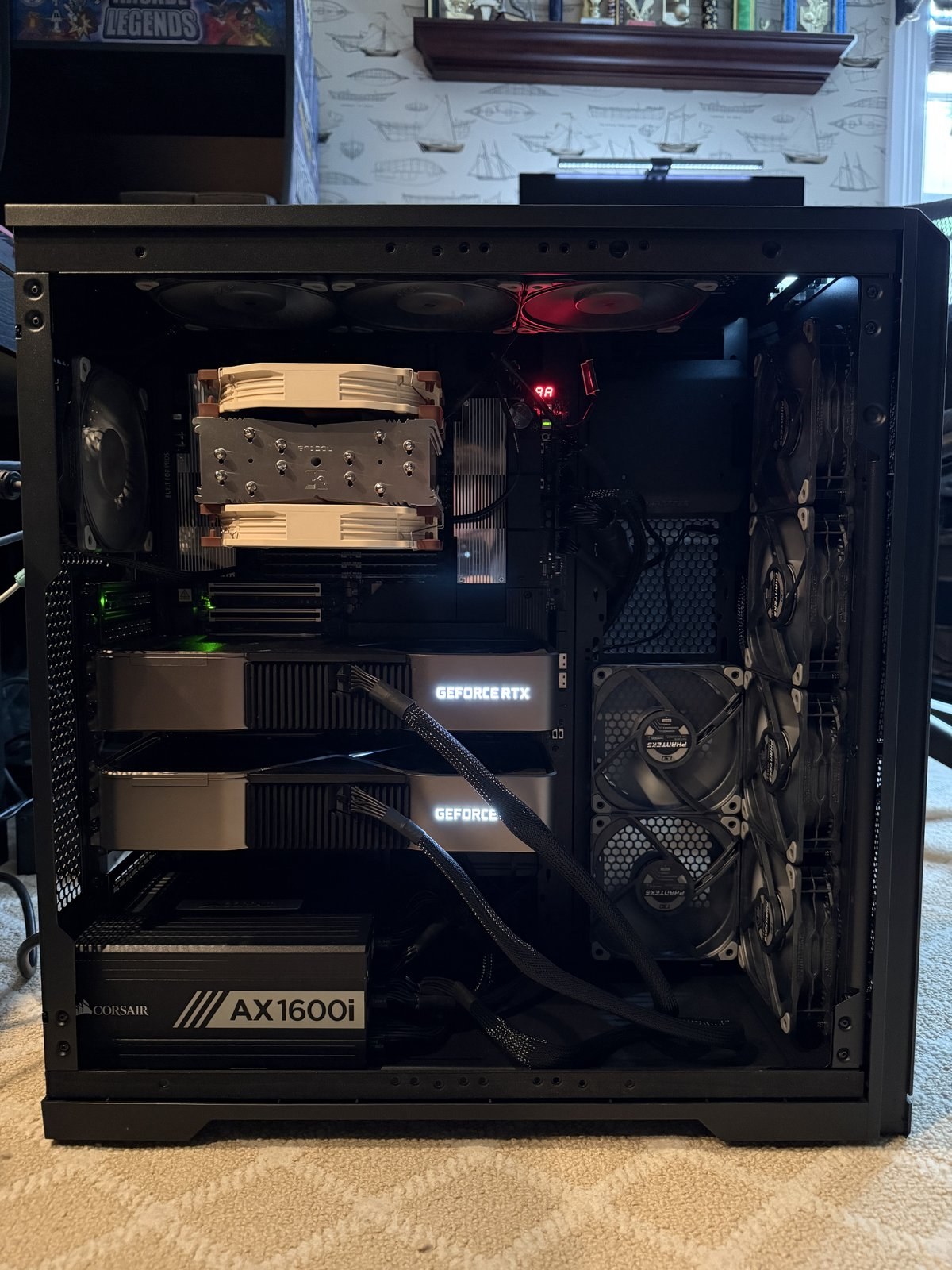
In V2, GPU 0 occupies PCIe slot 3 and GPU 1 occupies the final physical slot, slot 7. Both negotiated PCIe Gen4 x16 under load. Their three-slot bodies retain one physical slot-width of breathing room between them—a major improvement over V1. This is key here. For anyone who wants to use 3090s (the non-blower card versions) you must have at least 1 PCIe slot between them – otherwise thermal throttling will become an issue. You can try all you want to get around this, but in the end, unless you do some serious work, such as 3D printing special fan channels, jury-rigging cooling solutions – it’s not worth it. You can still run the cards without the space if you choose to do this – but be warned, the lifespan of your cards will be cut short at high workloads.

There is no NVLink bridge installed, and the 48 GB figure is not automatically pooled VRAM. Frameworks and model backends must explicitly distribute weights and work across both cards.
The lesson is not “never buy 3090s.” The lesson is to understand what you are buying around them. They gave me an affordable way to build and measure the rest of the system. When they eventually stop earning their slots, the slots will still be ready.
Power – Don’t Be Cheap!
Power supplies and cables are not the sexy part of a local AI build. They are the part that can destroy every sexy part if you treat them casually.
The machine uses one Corsair AX1600i: a fully modular, 1600 W, 80 Plus Titanium PSU carried forward from V1. Each RTX 3090 FE uses its own dedicated Corsair CP-8920274 cable. Each cable runs from two PSU-side 8-pin connectors to the card’s 12-pin Founders Edition connector.
The motherboard also requires more than a normal consumer build. In addition to the main 24-pin ATX connection and both required CPU EPS feeds, I populated both supplemental PCIe board-power inputs used to support a multi-GPU configuration. This is something that surprised me when I started to build the machine. I spent literally hours upon hours researching my parts and I missed this one. A lot of people do not mention this for the Threadripper PRO systems – when you get a big boy board like I have, you need extra power to stabilize the board. So if you do get this mobo – make sure you have proper PCIe cables for it.
If you remember only one thing from this section, remember this: never assume modular PSU cables are interchangeable. Do not mix cables across brands. Do not assume two power supplies from the same company use the same pinout. Use only cables whose exact PSU family and cable type have been verified by the manufacturer. The best outcome from the wrong cable may be a machine that refuses to boot. The worst outcomes include damaged hardware, melted connectors, or blowing up your house.
Household electrical capacity matters too. A common U.S. 15-amp, 120-volt branch circuit is nominally 1,800 volt-amperes. Sustained-load planning, PSU conversion loss, transients, everything else on the branch, and the actual circuit all matter. Plugging a second PSU into another receptacle does not solve anything if both receptacles live on the same branch.
I have not instrumented whole-system wall power, so I will not invent a wall-watt number. Component telemetry during the deliberately extreme combined test reached roughly 920 W across the CPU and GPUs alone. That excludes the motherboard, memory, cooling, storage, networking, and PSU conversion losses. The AX1600i handled the machine, but the system found a thermal limit before a power-delivery limit.
The Case: Airflow, Space and Visibility

Fitting this hardware into a clean closed case was a major design requirement for me.
I chose the Phanteks Enthoo Pro II Server Edition TG (tempered glass). The glass is the side panel; the front remains the intake surface. The official chassis dimensions are 240 × 580 × 560 mm, and it supports SSI-EEB motherboards and eleven physical PCI slots.
There are larger cases. There are rackmount solutions. There are open-air mining frames that can hold a small civilization of RTX 3090s with enough risers and questionable life choices.
That was not the machine I wanted.
I wanted a large but contained server/workstation: enough room for the EEB board, two widely spaced three-slot GPUs, a large CPU air cooler, ten chassis fans, future storage cages, and clean routing—without turning the lab into a warehouse rack.
Aesthetics are all that matter in many ways. I was not building a disposable test bench. That’s not to say an open rack is dirty and unclean. I wanted to build something that represented the pinnacle of human engineering – or at least, that was the goal.
The tempered-glass side panel also gives me useful visual confirmation through a remote camera. I can see whether fans are spinning, whether an unexpected light appears, or whether something physically obvious has changed. That camera is a secondary observation tool, not the safety system. Proper power design, telemetry, remote shutdown, smoke detection, surge protection, and human intervention matter far more than looking through glass after a problem has already begun.
Cooling

Cooling is one of the most underrated engineering problems in local AI. A gaming PC reaches high load in bursts. A local inference server can hold GPUs at sustained compute and power for minutes, hours, and days while also moving tens of gigabytes of weights through system memory.
There are two broad approaches: air and liquid. Liquid cooling can deliver excellent CPU performance, and modern AIO failure rates are low. I still chose an entirely air-cooled system because this machine is intended to operate remotely and remain simple to service.
That was a tradeoff, not a religious commandment. Air cooling gives me fewer pumps, tubes, and liquid-bearing components to monitor. Liquid cooling could create more CPU thermal margin. I accepted lower peak CPU cooling capacity in exchange for the remote-reliability profile I preferred. That said, I followed Occam’s razor: simple is best.
Fans: T30s and the Noctua Air Cooler
The chassis contains ten Phanteks T30-120 fans, all set to their physical Advanced mode. Each fan has three settings, selected with a physical switch. Advanced mode allows up to 3,000 RPM if needed. The 30 mm frame allows Phanteks to use thicker blades and a stronger design than a typical 25 mm fan. Advanced mode does not mean all ten fans scream at 3,000 RPM every second. It makes the higher ceiling available to the motherboard’s fan curves. 30 mm means air gets pushed into deeper parts of the case compared to a 25 mm fan. I don’t care about noise – cooling was a major engineered design for this build. At peak sustained loads, it’s not even that bad!
The final chassis layout is:
- four front T30s pulling fresh air into the case;
- two side/rear T30s pulling fresh air inward beside the GPU area;
- three top T30s exhausting upward;
- one upper-left CPU-area T30 exhausting outward.
That produces six chassis intakes and four chassis exhausts: a design intended for mild positive pressure with an upward and rearward exhaust path.
The CPU cooler is the Noctua NH-U14S TR5-SP6, Noctua’s dedicated sTR5/SP6 tower for this class of Threadripper and EPYC platform. It uses two NF-A15 fans in push/pull through the heatsink. Heated air from the GPU 0 area moves through the CPU tower toward the top exhaust bank.

Including the two Noctua fans, the machine has twelve rotating fans.
Did that design work? CPU-only endurance passed. Dual-GPU endurance passed. GPU-dominant inference passed repeatedly. The deliberately pathological all-components-at-once test still found the CPU cooler’s boundary. Those measurements—and the operating rule they produced—belong in Part 2 of this project. The final fan map, pressure strategy, and cooling boundaries are documented in the repository’s airflow and cooling design here.
Storage
I have one Samsung 9100 PRO 2 TB NVMe drive installed in the motherboard’s M.2_1 position. It is a PCIe 5.0 x4 drive—not x16—and it contains Ubuntu, the software stack, active projects, and the model weights I am currently using.
My mom gave me the drive. Shout-out to my mom. She is a saint.
Two terabytes disappears quickly when individual models can consume tens or hundreds of gigabytes. The long-term plan is to use high- capacity HDD storage as an archive for model weights and datasets, then copy active weights onto the NVMe when I need them.
One more important thing to add – storage has been claimed by the AI bubble – do not even bother looking at 4 TB or higher for NVMe – the prices will make you throw up. For now, I am spacing out the purchases because I do not work at OpenAI and I do not own a venture capital firm.
Build Day: The World’s Most Expensive Pizza
The case came first.
I inspected it empty, vacuumed it, and wiped it down. Always inspect and clean a case before putting expensive components inside it. Manufacturing debris, loose screws, packaging fragments, and dust are cheaper to find when the motherboard is not already installed. *I did find many plastic shavings inside the case before I set it up – always wipe down and vacuum the case before you set it up*.
Then came the motherboard, placed flat on a protected surface. I installed the Threadripper PRO CPU, populated all eight RDIMMs, and mounted the Noctua cooler with its two fans connected through the supplied splitter to CPU_FAN.
This part is very important, please pay attention here. Sometimes, professional mobos need work on them before you even put your build all together. In my case the BIOS that came pre-installed with the mobo, was not up to date, and I needed to flash the BIOS with, at the time, the most recent BIOS. This is very important to understand. If I did not flash this BIOS – the POST for the machine would have failed – because, with the preinstalled BIOS, 9000 series AMD CPUs would not be accepted. On top of that, this board has tiny switches, and you need to check if they are in their correct defaults otherwise, you will have issues POSTing your machine. It’s easier to do this when the motherboard is sitting flat on a table – and not in a chassis. I updated the motherboard firmware through ASUS BIOS FlashBack. The board originally predated native 9000 WX support; ASUS lists the 9955WX as supported from BIOS 1106.

With the CPU, cooler, and RAM installed, and the new BIOS it was time to place the board into the chassis. At that moment I was holding the motherboard, CPU, RAM, and cooler together in both hands like the world’s most expensive pizza.
Some people install a loaded motherboard with the case standing upright. Those people probably walk barefoot in the streets of New York City. Completely insane behavior.
Then came power: the 24-pin ATX connection, both CPU EPS feeds, and both supplemental PCIe board-power connections. The professional workstation board required more cabling than the consumer systems I had built before, and I was fortunate that the AX1600i package included the right compatible cables.
Next I installed the T30 fan groups, connected the chassis wiring to the correct headers, and routed the airflow exactly as planned.
I installed one RTX 3090 for first boot so I could do the initial Ubuntu work, then added the second card in its final lower slot once the base system was stable. The completed placement put GPU 0 in slot 3 and GPU 1 in slot 7, leaving the airflow gap V1 never had.
No NVLink bridge. No anti-sag bracket. No mystery cables. No decorative component counted as installed because it appeared in a plan six weeks earlier.
The machine POSTed. The complete assembly sequence, firmware preparation, and lessons from build day are preserved in the repository’s public build notes. Then the real work began.
Ubuntu, BMC, and a machine I can recover remotely
V2 runs Ubuntu 24.04.4 LTS. This was not an aesthetic decision or a chance to perform my hatred of Windows for the internet—although I will happily do that for free.
Linux is the native environment for the software I wanted to use: CUDA, NCCL, vLLM, llama.cpp, container tooling, system services, telemetry, and the model-serving ecosystem generally. V1 could perform serious work under Windows. V2 was built to operate like a data center. Also – all AI runs on Linux.
The motherboard’s integrated ASPEED baseboard management controller is one of the defining features of the rebuild. It provides a management console independent of Ubuntu and independent of both RTX 3090s. Neither compute card has to waste resources driving a display, and I can still see POST, enter the BIOS, inspect sensors, and perform recovery work remotely.
Normal access is SSH. The BMC is the recovery path. Management access sits behind an isolated relay rather than being exposed as an ordinary network service. The public lesson is the architecture, not an instruction manual for reaching my research lab.
What It Cost
There is no honest way to discuss this project without discussing money.
Swipe horizontally to view the complete cost table.
| Component | Build origin | Purchase date | Purchased from | Item price | Protection plan | Shipping | Pre-tax total | Sales tax | Post-tax total |
|---|---|---|---|---|---|---|---|---|---|
| Noctua NH-U14S TR5-SP6 CPU cooler | New for V2 | Micro Center | $139.99 | None | $0.00 | $139.99 | $12.08 | $152.07 | |
| ASUS Pro WS WRX90E-SAGE SE motherboard | New for V2 | Micro Center | $1,199.99 | 2 years — $139.99 | $0.00 | $1,339.98 | $115.64 | $1,455.62 | |
| Phanteks Enthoo Pro II Server Edition TG chassis | New for V2 | Phanteks | $189.99 | None | $40.00 | $229.99 | $0.00 | $229.99 | |
| AMD Ryzen Threadripper PRO 9955WX | New for V2 | Micro Center | $1,499.99 | 2 years — $139.99 | $0.00 | $1,639.98 | $141.53 | $1,781.51 | |
| Kingston FURY Renegade Pro 128 GB DDR5-6400 ECC RDIMM kit | New for V2 | CDW | $3,686.48 | None | $50.98 | $3,737.46 | $322.35 | $4,059.81 | |
| 10× Phanteks T30-120 fans | New for V2 | Phanteks | $384.96 | None | $0.00 | $384.96 | $0.00 | $384.96 | |
| 1× Phanteks T30-120 add-on fan | New for V2 | Phanteks | $39.99 | None | $5.00 | $44.99 | $4.00 | $48.99 | |
| Samsung 9100 PRO 2 TB PCIe 5.0 NVMe | Gifted for V2 | Amazon | $304.97 | None | $0.00 | $304.97 | $21.35 | $326.32 | |
| NVIDIA RTX 3090 Founders Edition — GPU 0 | V1 carryover | Micro Center | $629.96 | 2 years — $79.99 | $0.00 | $709.95 | $61.27 | $771.22 | |
| NVIDIA RTX 3090 Founders Edition — GPU 1 | V1 carryover | Micro Center | $699.99 | 2 years — $79.99 | $0.00 | $779.98 | $54.60 | $834.58 | |
| Corsair AX1600i 1600 W power supply | V1 carryover | Micro Center | $609.99 | None | $0.00 | $609.99 | $52.61 | $662.60 | |
| Corsair 12-pin GPU power cable — GPU 0 | V1 carryover | Corsair | $19.99 | None | $9.99 | $29.98 | $2.59 | $32.57 | |
| Corsair 12-pin GPU power cable — GPU 1 | V1 carryover | Corsair | $16.99 | None | $9.99 | $26.98 | $2.33 | $29.31 |
Cost Summary
Swipe horizontally to view the complete cost summary.
| Cost scope | Item prices | Protection plans | Shipping | Pre-tax total | Sales tax | Post-tax total |
|---|---|---|---|---|---|---|
| V2-acquired components | $7,446.36 | $279.98 | $95.98 | $7,822.32 | $616.95 | $8,439.27 |
| V1 hardware and paid protection plans carried into V2 | $1,976.92 | $159.98 | $19.98 | $2,156.88 | $173.40 | $2,330.28 |
| Total machine acquisition value | $9,423.28 | $439.96 | $115.96 | $9,979.20 | $790.35 | $10,769.55 |
The reconciled component ledger and reusable cost data are available in the public bill of materials and the machine-readable CSV.
I was fortunate to buy the two RTX 3090s and AX1600i before the worst of the current AI hardware market. I was fortunate to receive the NVMe as a gift. I also spent more than four thousand dollars on 128 GB of RAM and nearly eleven thousand dollars in tracked machine acquisition value.
I took that gamble because I believe the research, engineering, and public work can help me reach the next stage of my career. I want to work at a top AI lab or an exceptional startup. I am not treating that as something I deserve because I bought expensive hardware. The value comes from what I learn, measure, build, document, and share with it.
You do not need to spend this amount to begin.
One GPU, a normal AM4, AM5, or Intel platform, and 64 GB of consumer memory can teach you an enormous amount. Start with the workload you actually have. Let the machine earn its next upgrade.
The other cost is time, and almost nobody puts it in the build chart.
Local AI is not “build the rig and you are done.” Drivers regress. Inference engines take time to support new architectures. Model files get replaced. Quantizations behave differently. Chat templates fail. Long contexts expose memory problems. Generated applications can look successful in a terminal while rendering a blank screen.
The hole is infinite because people keep digging it deeper.
I have lost count of the nights when I went to bed at two, three, or four in the morning and woke up a few hours later to continue. Codex and Claude Code made this project possible in terms of speed and testing, but agents do not remove the need to understand the system. If you do not learn enough to verify them, they can automate a mistake faster than you could make it manually.
The real requirement for local AI is not a $10,000 budget. It is curiosity, patience, and a willingness to keep going.
What I Got Wrong During the Build
The no-bullshit promise at the beginning means this section cannot be optional.
I underestimated how difficult and expensive the memory purchase would become.
I initially thought buying four large DIMMs and adding four more later would be the smart path. I had not fully accounted for exposing all eight channels from day one or the risk of combining separately purchased kits.
I bought the 16-core CPU before knowing exactly how much CPU-side memory bandwidth my hybrid MoE workloads would consume. That does not make the purchase wrong, but it changed the future CPU-upgrade argument from theory into something measurable.
I also learned that a professional workstation board brings unfamiliar power, firmware, and management requirements. The answer was not to pretend I knew everything. It was to slow down, read the manuals, verify each connection, preserve known-good states, and refuse to turn guesses into facts.
The commissioning process uncovered more mistakes. They deserve their own article because each one changed how I operate the machine (in Part 2 of this project).
Did It work?
Yes.
The completed server passed sustained CPU testing, dual-GPU deterministic compute, VRAM pattern testing, memory testing, storage-health checks, network validation, and remote-recovery drills. Both RTX 3090s ran at PCIe Gen4 x16 under load. CPU-only and dual-GPU endurance passed. The final machine is stable for its intended GPU-dominant and hybrid local-AI workload.
It also found a real limit: unrestricted maximum CPU plus maximum dual-GPU synthetic saturation pushed the CPU to its 95°C regulation boundary. The system continued computing correctly, but that corner is not approved for unattended operation in the current cooling configuration.
Most importantly, the server did what I built it to do. It ran GPT-OSS-120B successfully, served a nearly 200-billion-parameter mixture-of-experts model, and made models much larger than its 48 GB of physical VRAM genuinely usable through carefully engineered GPU and system-memory placement.
Future Upgrades – What Comes Next
V2 is complete, but it is not finished forever. That is the entire point.
The practical next steps are straightforward:
- add the compatible UPS behind the installed Zero Surge protection layer
- install high-capacity HDD storage for archived model weights and datasets
- improve the remaining cable-routing and optional fan position
- NVLink, only for speeding up fine-tunes on models
A 24-core or 32-core Threadripper PRO is the most interesting CPU path because commissioning exposed a real CPU-side bandwidth opportunity in hybrid MoE decode. I will not buy that upgrade because a spreadsheet predicts a beautiful multiplier. I will buy it when the frequency of the workload and the measured opportunity justify it.
The dream remains one or more RTX PRO 6000-class cards: enormous memory capacity, a professional form factor, and far better density than stacking more 3090s. The motherboard and case make that future physically plausible. For more: the machine’s current constraints and evidence-driven upgrade order are tracked in the repository’s limitations and upgrade path.
Build the Platform You Can Grow Into
V1 proved that two used RTX 3090s could make local AI practical.
V2 rebuilt everything around them: lanes, memory, Linux, cooling, power, recovery, and room to grow.
The result is not the fastest local AI system in the world. It is not a data center. It is something more useful: a recoverable, upgradeable local AI platform built around a plan instead of a parts list. That is what professional infrastructure means to me. Not perfection. Not unlimited money. Not a pile of GPUs photographed for attention. It means knowing why every major component is there, what can replace it, and what the machine must prove before I trust it.
The hardware is built. Now it is time to show exactly how hard I tested it. This project is part 1 of a three-part series: the build. Part 2 covers the machine’s commissioning and operating limits. Part 3 covers the open-model testing performed on the finished cluster.
This is part of Project Arrival—my journey from Senior Data Scientist to AI research engineer. I’m documenting the build, the research, and the path toward joining a top AI lab. Follow along at blog.zacharycangemi.com or explore the complete technical record in the Local LLM Infrastructure V2 repository.
One response to “Go Big or Go Home, Part 1: My New AI Cluster”
[…] In this case, I am the only customer, and my hardware is a dual RTX 3090 Threadripper Pro system. If you want to see my actual full AI cluster set up – read this that I poasted. (we need to add its reasoning level – very important to throw in this […]